Instant Online Gaming
If you’re tired of gaming platforms that trap you in downloads, bomb you with intrusive ads, or lock fun behind paywalls, CrazyGames.com is here to redefine your experience. As a leading free online gaming hub with over 4,500 titles, it delivers seamless, ad-friendly gameplay across devices—no strings attached. Whether you’re craving multiplayer battles, casual puzzles, or action-packed adventures, this platform has something for every gamer. Below is your complete guide to navigating, enjoying, and maximizing everything CrazyGames.com has to offer.
What Makes CrazyGames.com Stand Out?
CrazyGames.com isn’t just another gaming site—it’s a curated experience designed for accessibility and fun. Here’s why it’s a fan favorite:
- 100% Free & Ad-Friendly: No hidden fees, premium locks, or annoying pop-ups. Enjoy full gameplay without interruptions.
- Instant Play (No Downloads!): All games run directly in your browser (Chrome, Firefox, Safari, Edge) or via the mobile app (iOS/Android). No software installs or storage space required.
- Cross-Device Versatility: Play on desktop (PC, laptop, Chromebook), smartphone, or tablet. The platform adapts flawlessly to keyboards, mice, or touch controls.
- Massive Game Library: With 4,500+ titles spanning every genre—from .io games to puzzles, sports to action—there’s always a new game to explore.
- Thriving Multiplayer Community: Join friends or global players in online games like Shell Shockers or Uno Online—no account needed for most titles.
- Exclusive “CrazyGames Originals”: Dive into unique, platform-exclusive games like EVOWARS NEW ERA and SPACE WAVES you won’t find elsewhere.
Step-by-Step Guide to Using CrazyGames.com
Using CrazyGames.com is intuitive, even for first-time users. Follow these simple steps to start gaming in seconds:
1. Access the Platform
- Browser: Open your preferred browser and type
https://www.crazygames.com/into the address bar. Hit enter—you’ll land on a vibrant homepage filled with game recommendations. - Mobile App: For on-the-go play, download the CrazyGames app from the App Store (iOS) or Google Play (Android). The app mirrors the web experience with faster load times.
2. Navigate the Homepage Like a Pro
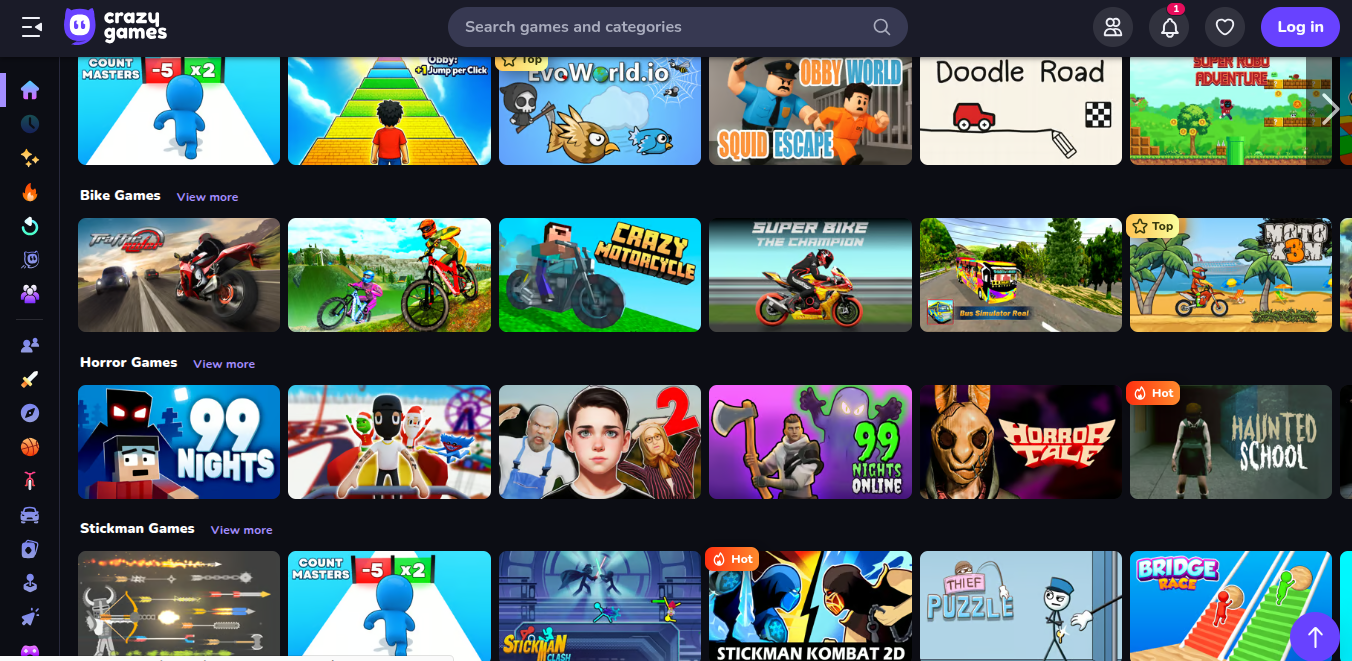
The homepage is designed for discovery, with clear sections to help you find your next obsession:
- Search Bar: Located at the top, type in a game name (e.g., Geometry Dash) or genre (e.g., “driving games”) to find exact matches instantly.
- Top Navigation Genres: Click main categories like Driving Games, Shooting Games, Puzzle Games, or .io Games at the top of the page for curated collections.
- Personalized Recommendations: The “Top picks for you” section highlights games tailored to popular trends (e.g., Obby Car Challenge, Draw Climber).
- Special Collections: Explore “CrazyGames Originals” for exclusive titles, “Games to Play with Friends” for multiplayer fun, and “New games” for the latest additions.
- Subcategory Tags: Hover over genres to find subcategories like car games, 2-player games, match 3 games, or mahjong—perfect for narrowing down your search.
3. Dive Into Gameplay (No Setup Required!)
Once you’ve found a game that catches your eye, click its thumbnail. The game loads instantly in your browser or app—no account creation or progress saves needed (unless you want to, for select titles). Most games include on-screen controls:
- Desktop: Use WASD/arrow keys for movement, mouse clicks for actions (e.g., shooting in Shell Shockers), and spacebar for jumps/boosts.
- Mobile: Tap responsive touch buttons to play—ideal for casual games like Aquapark.io or Bridge Race.
4. Customize Your Experience
While CrazyGames.com keeps things simple, most games offer basic settings to tweak:
- Sound: Toggle background music or sound effects on/off (great for quiet environments like offices or classrooms).
- Graphics Quality: Adjust resolution to fix lag on older devices—choose “low” for smoother play on budget phones/laptops.
- Multiplayer Options: For online games like Smash Karts, join public lobbies or share a link to play with friends directly.
5. Switch Games or Exit Seamlessly
- Web: Click your browser’s “back” button to return to the homepage and browse more titles. Close the game tab to switch instantly—no waiting.
- App: Tap the “Home” button to return to the app’s main screen. Swipe away the game to exit completely.
Top Game Recommendations on CrazyGames.com
With 4,500+ games, here are the must-try titles that define the platform:
-
Multiplayer: Shell Shockers
A viral egg-themed shooter where you battle other players online. Customize your egg’s weapons, team up with friends, and dominate chaotic arenas—pure silly fun with intense gameplay. -
Action: Geometry Dash
A fast-paced rhythm-based platformer. Jump, fly, and flip through challenging levels synced to electronic music. It’s addictive, challenging, and perfect for players who love mastering precision. -
Casual: Moto X3M
A stunt motorcycle game with wild tracks, obstacles, and physics-based fun. Race through loops, ramps, and explosions—simple controls, endless replayability. -
Puzzle: Mahjongg Solitaire
A classic tile-matching game with modern visuals. Clear the board by pairing identical tiles—relaxing, strategic, and great for short breaks. -
Party: Uno Online
The beloved card game, now online. Play with friends or random players worldwide, draw wild cards, and outsmart opponents—ideal for group fun.
Pro Tips for the Best Experience
- Stable Internet = Smooth Play: Since games load in your browser/app, a strong Wi-Fi or data connection prevents lag—critical for multiplayer titles.
- Explore Originals: Don’t miss “CrazyGames Originals” like EVOWARS NEW ERA—these exclusive games are designed for the platform’s community.
- Try 2-Player Games: The “Games to Play with Friends” section (e.g., Ragdoll Archers) is perfect for co-op or competitive fun with family.
- Bookmark Favorites: Save your go-to games in your browser or app for quick access later.
- Game Responsibly: With so many addictive titles, set a timer if you’re gaming during breaks to avoid losing track of time.